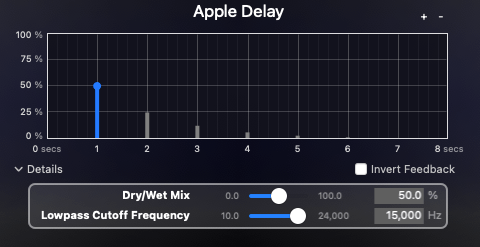
Hello! This is Jooyoung Kim, an mixing engineer and music producer. Today, I want to delve into the time effect known as delay.
Shall we get started?
So, what exactly is delay?
It’s simple, really. Delay is an effect that repeats the same sound with a time difference.
Why would we use this effect, though? There are several reasons, which can be summarized as follows:
- Using only reverb can sometimes create unnatural reverb tails.
- The feedback feature allows for the creation of very long reverb tails.
- It can add an artificial groove to a source.
- Special delay effects can be applied to instruments (especially common with electric guitars, and can also be used with short delays).
Effectively using delay can create a rich and natural reverb. If you’ve only been using reverb to add space to your mix, try incorporating delay as well.

I personally favor UAD’s Precision Delay because it lets you set the delay time in seconds rather than adjusting it via feedback. By setting the delay time similarly to RT60, which I’ll discuss in the reverb section, the sound can fade naturally.
Using a delay plugin to set the pre-delay instead of the reverb plugin’s pre-delay can also be effective. Especially if the reverb plugin doesn’t allow synchronization of the pre-delay time with the BPM, you can achieve a precise pre-delay using a delay plugin that does.

Setting a very short delay with minimal feedback and then filtering out high and low frequencies, while adjusting the volume, can create a subtle groove that wasn’t originally show in the source. This can add a sticky, rhythmic feel to percussion, which is particularly useful in genres like R&B and hip-hop.
Using historical replica delays can also help recreate the vintage sound of old-school or retro music.
There are countless crucial aspects of mixing, but I believe that handling reverb effectively is one of the key factors that define the quality of a sound. However, this is an area that’s hard to explain solely with words. You really have to experiment with various delay and reverb plugins to grasp it fully. It’s a challenging aspect, even for me.
Today, we’ll wrap up with this brief overview of delay. See you in the next post!

 Jooyoung's Music Blog