※This article is a review written on July 21, 2021 after being selected for the FX Collection 2 experience group run by ‘Samick’ and receiving product support for a certain period of time. I only received support for the product and wrote the rest myself.
Chorus Dimension-D is the one that made me interested in Arturia’s FX Collection.
The original was released in the late 1970s and operated with just a few simple buttons. This friend also has the characteristic of using BBD like Jun-6, and it can be seen that it is in line with the fact that the parameters are quite simple.
Arturia added additional parameters to the original to allow for more diverse control of the Chorus effect.

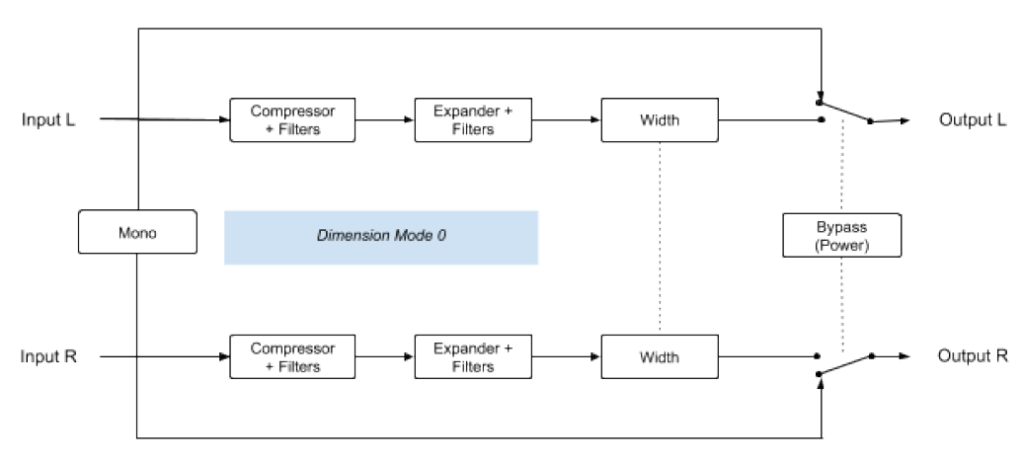
Signal Flow is quite complex. The front part is somewhat similar to the previous Jun-6 (that’s why I introduced Jun-6 first…^^), but Comp and Expander are also added to the filter, and it shows various complex aspects. It is said that the reason for this was to solve the problem of a lot of noise in the BBD area.
Anyway, there aren’t that many things we can control, so I think you can roughly look at it like this.
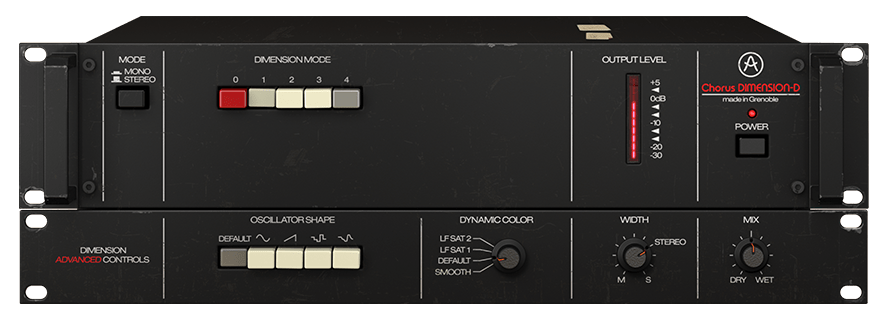
- Mode & Dimension Mode

The Mode button is a button that determines whether to receive the source in Stereo or Mono. If you select Mono, the signal combined through Mono-Sum from the stereo source goes into the input.
There are a total of 5 Dimension Mode buttons. In the original hardware, the 0 button was just a Bypass button, but like the Signal Path below, Arturia made it possible to apply some color through Comp, Expander, and Filter together.
Additionally, button 1 is the softest Chorus, button 2 is a stronger Chorus but has half the Delay Time, and button 3 has a shorter Delay Time than the other two modes, but has twice the amount of LFO Modulation, making it a more distinct Chorus.
Button 4 is a special button that applies more wet signals in addition to the other 3 buttons. Therefore, pressing it alone will not work. (There are quite a few different explanations on the web, but Arturia says this is what they actually measured..^^)
In the original hardware, you can press multiple buttons, but even if you actually press them, only the effect with the highest number is used, so such a function is not included in the plug-in.
- Advanced Control

In Advanced Control, you can adjust the shape of the LFO oscillator, Compressor/Expander’s Time Constant (you can think of it as a general term for response speed or methods), Width, and Dry/Wet.
There are five types of oscillators to choose from: triangle wave (Default), Sine, Ramp (Ascending Saw Wave), two random forms, Sample & Glide, and Sample & Hold. The colors are much different than you might expect, so we recommend that you try them all.
In Dynamic Color, LF Sat 1&2 has a shorter Time Constant, resulting in slightly more Saturation, which is noticeable at Lower Frequency. Additionally, the position marked as Default is the same as the hardware’s default setting, and the position marked as Smooth is said to have smoother attack and release.
Width literally controls the stereo image, and Mix lets you control Dry/Wet.
- Samples
There are so many additional parameters from Arturia that it would be too much to do them all. Therefore, we will not touch any additional parameters and will only adjust the Dimension Mode button in the default state.
The order is repeated a total of 8 times in the following order: original track – (0) – (1) – (2) – (3) – (1+4) – (2+4) – (3+4)
Surprisingly, contrary to Arturia’s explanation, I felt that button 3 was a bit quiet. I really liked the effects themselves.
- Chorus Dimension D Overall Review
This is a plugin that I really liked. I wasn’t able to hear it here, but if you adjust the oscillator shape or dynamic color, the effects sound different and richer.
Also, personally, I thought that if I used this plug-in on friends who obscure the vocals in the center, such as Clap or Snare, and widened the stereo image a little, the effect would be really good.
Of all the plugins I’ve featured so far, I’d say just please take my money. Even if I don’t receive the plugin as a review event product, I will definitely buy it if it goes on sale someday.
Actually, I don’t have anything worth showing about this type of Modulation series, so it seems very difficult to use it analytically like Compressor or EQ. Therefore, it seems that a lot of subjective opinions are mixed in unintentionally. This can feel quite different from person to person, so if you are curious, we recommend that you try the demo right away.
If you purchase through the link above, I will receive a small commission, which greatly helps in running the blog.

 Jooyoung's Music Blog