※This article is a review written on July 21, 2021 after being selected for the FX Collection 2 experience group run by ‘Samick’ and receiving product support for a certain period of time. I only received support for the product and wrote the rest myself.
The Flanger BL-20 is a plug-in that is a clone of the Bel Flanger BF-20. This friend is said to have been released by a British company called Bel Electronics in the late 70s.
Like the other two Chorus introduced above, it features BBD in the internal circuit and has a signal flow slightly similar to Dimension-D.

In some ways, this friend’s Signal Flow is similar to Dimension-D, but if you exclude Reverse Sweep, Stereo Offset, CV Gen, and the Regen part, which is the feedback part, the circuit can be considered almost the same.
Let’s move on to the parameter description.
- Power
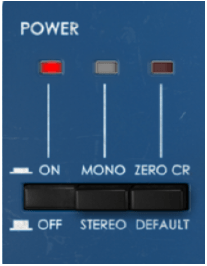
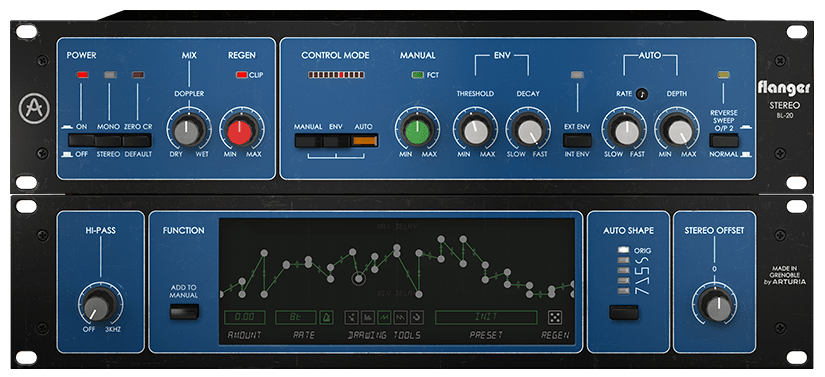
First of all, there are three switches in the power section. The leftmost switch is the On/Off switch, and the middle switch determines whether to receive the signal in Mono-Sum or Stereo.
The switch on the right is not a switch on the original hardware, and is the switch that activates Zero Crossing Mode. When this button is activated, the polarity of the modulated signal is reversed and the dry signal of the average delay curve is delayed, resulting in a zero crossing effect.
Generally, a Flanger is an effect that creates a Comb Filtering effect by combining a delayed signal and a dry signal. According to Arturia’s explanation, the Zero CR button inverts the phase of the delayed signal, resulting in the effect being created by subtracting the delayed signal from the dry signal. It still has the Flanger effect, but it’s stronger, thicker, and wetter.
- Mix & Regen

Mix represents the ratio of the delayed signal (wet) and the original signal (dry). When you mix the two signals, the Comb Filter effect appears and the Flanger effect appears. If you turn it completely to Dry or Wet, the Flanger effect does not appear prominently.
Regen is the side shown in red in the Signal Flow above. Control the amount of feedback. You can increase the Comb Filter effect by increasing this amount.
- Control Mode
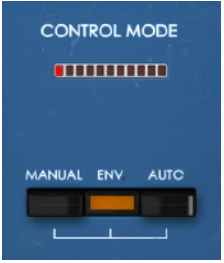
There are three buttons in Control Mode. Each button is a button that selects the way it operates, and you can use a combination of 2 or 3 types.
The effect can be adjusted by adjusting the corresponding part on the right side of the panel for each button, and the red LED above moves around depending on how you adjust it.
By default, Auto Mode is turned on, and in this Auto Mode, the original triangle waveform LFO is controlled, but through Advanced Control, you can change the LFO waveform or adjust it as desired.
- Manual & Env
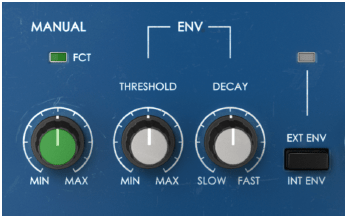
Manual is a knob that manually adjusts the flanger. As you go to Min, the Comb Filter becomes a bit looser, and as you go to Max, the Comb Filter becomes tighter.
Env is a value created to respond to the level of the audio signal.
Env has three controls:
1) Threshold is a knob that adjusts the intensity of the flanger differently depending on the level of the audio signal.
2) Decay is a knob that controls the time it takes for the value to reach 0 after the envelope is deactivated.
3) The third control button is a button that can accept external sidechain signals and adjust the envelope accordingly.
It is not easy to understand if you just look at it like this, but you can think of it as somewhat similar to the Compressor parameters.
If you adjust the Threshold well, you can clearly see the difference between where the flanger enters strongly and where it enters weakly, and the faster you set Decay, the faster the flanger comes out, allowing you to use it more effectively.
- Auto & Reverse Sweep
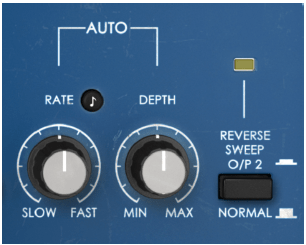
Auto literally gives an LFO automatically to create a flanging effect. So the knobs are quite intuitive. You can adjust the speed (frequency) of the LFO or select the amount of Depth.
The Reverse Sweep button inverts the phase of the Right channel, greatly widening the stereo image. It seems to be the same as the principle of M/S, and according to this, sound is produced even in the anti-phase area.
- Advanced Control
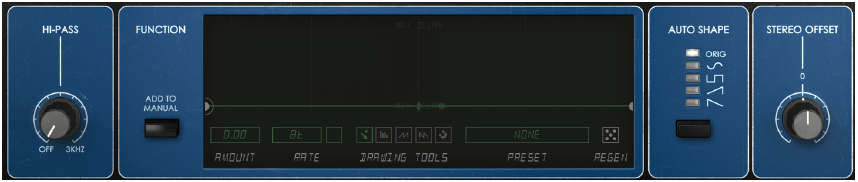
In Advanced Control, there is a 12dB/Oct Hi Pass Filter function, a function to create the shape of a function generator that can be added to Manual mode (said to be the same as the generator included in Arturia’s Pigments or OB-Xa V), and an Auto LFO of 5. There are two functions to choose from, the Stereo Offset function, which is similar to Stereo Width, but works differently.
Especially in the Function Generator function, you can use the Flanger quite a bit and have fun. We recommend that you try to drastically adjust the values or waveforms displayed under the display with Preset.
- Samples
I will just attach a simple sample. There are so many different parameters that it seems like it would be very confusing, but I will set it to my liking in the following order: Original Track – Manual – Manual+Function Generator – Env – Auto.
I’m really sorry to keep telling you this, but I think you’ll get a better feel for this type of modulation if you try it yourself.
Also, the mono sounds were too boring, so I pressed the Reverse Sweep button to widen the stereo image. If you listen to the Reverse Sweep button being pressed in the Manual, you will get a feel for how Reverse Sweep works.
How do you feel? There are quite a number of ways to use these values, such as plug-in and mixing them, using the Function Generator in various ways, or changing the oscillator waveform in the Auto section.
It felt a bit extreme, but I really liked it.
- Flanger BL-20 overall review
It’s a plugin I didn’t expect much from, but it leaves a pretty good impression.
The parameters are not that simple, so it takes some time to learn how to operate them, and you have to think about how to operate them, but once you learn them, you seem to be able to operate them quickly.
This friend thought it would be good to come out with a minor version of the plug-in that would not use the Advanced Control part.
Hmm… As I was writing this, a thought suddenly occurred to me. Arturia’s plug-ins are often a bit heavy, so it would be nice to be able to download not only BL-20 but also minor version plug-ins that do not use Advanced Control for all plug-ins. Although I took a slightly different route while using it, I am quite satisfied with the plugin.
If you purchase through the link above, I will receive a small commission, which greatly helps in running the blog.

 Jooyoung's Music Blog