Arturia FX Collection 2 Plug-In Review (Part 4, Chorus Jun-6)

※This article is a review written on July 21, 2021 after being selected for the FX Collection 2 experience group run by ‘Samick’ and receiving product support for a certain period of time. I only received support for the product and wrote the rest myself.

Chorus Jun-6

Chorus Jun-6 is a Chorus that was released for free by Arturia at the end of 2020, so I know there are quite a few people who have it. This friend is a plug-in that is a clone of the Chorus part that was included in the old Roland synthesizers Juno 6 and Juno 60. As for hardware, there is also a clone pedal from TC Electronics called June-60.

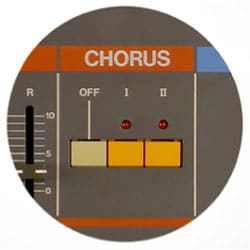
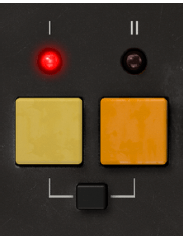
​In fact, the Chorus part that was originally attached to the synthesizer did not have various parameters like the plug-in above, but simply had three buttons as shown in the picture below.

In the above part, you could have three types of Chorus effects by pressing the I or II buttons, or both buttons.

The reprint plug-in from Arturia reproduces all three Choruses, but adds several additional parameters to allow people to further refine the Chorus effect.

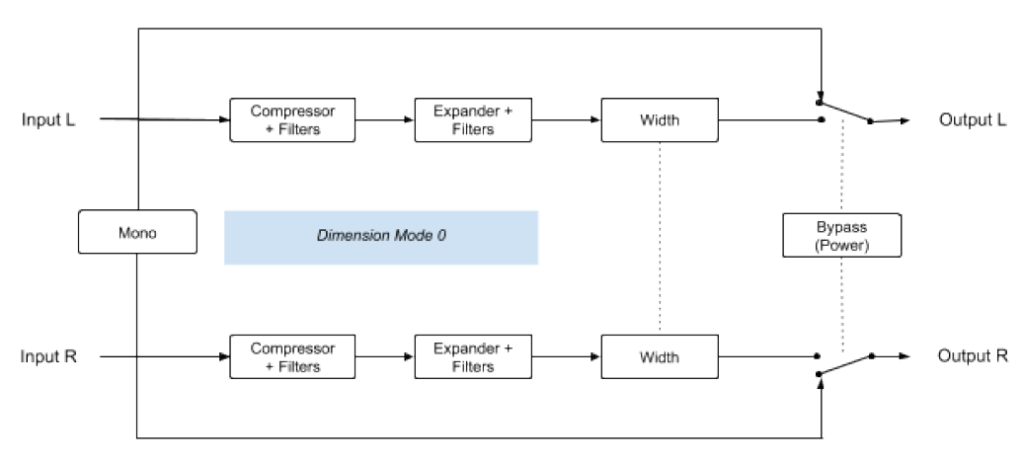
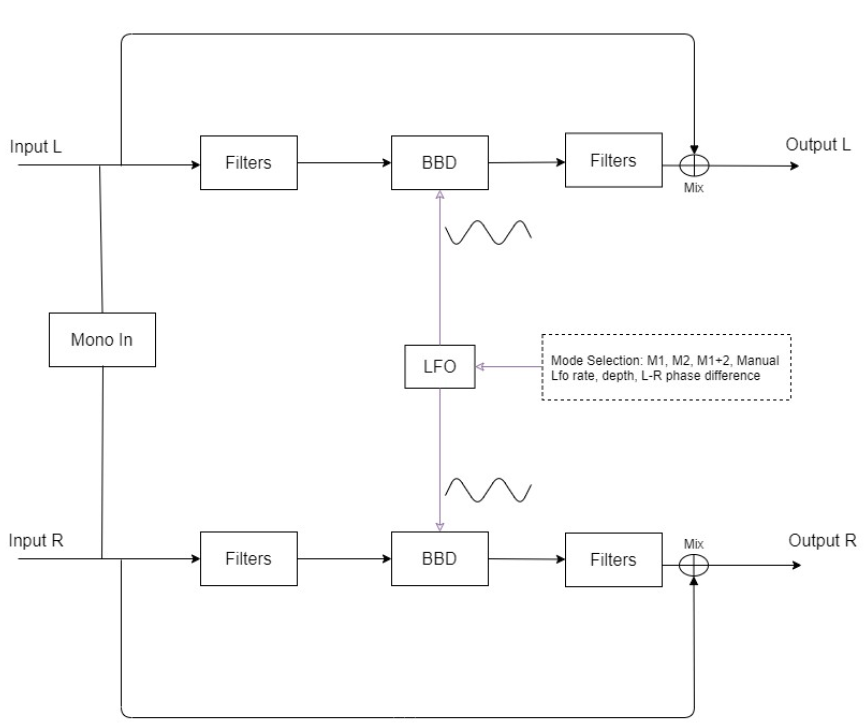
The Signal Flow of Chorus Jun-6 is as shown in the photo above. The original Chorus included in the Juno synthesizer accepts a Mono signal and outputs it as Stereo, but Arturia’s plug-in accepts a Stereo signal and directly produces a Chorus effect, or converts Stereo to Mono through Mono-Sum and outputs it as Stereo. There is a function that can add a chorus effect.

I think you will get a feel for it if you look at the input section of Signal Flow. In Modulation, you can think of Filter as it is common to use a filter to modify the phase, and BBD is an abbreviation for Bucket-Brigade-Divice and can be thought of as a type of specially made capacitor.

​Well, this is not particularly important, and most of the parameters we can control in the plug-in are values ​​related to the LFO applied to BBD. The sound that has passed through the LFO passes through the Filter, is mixed with the original sound through the Mix knob, or is completely subtracted, and then goes out through the Output.

Now, let’s take a look at the parameters.

  • Power

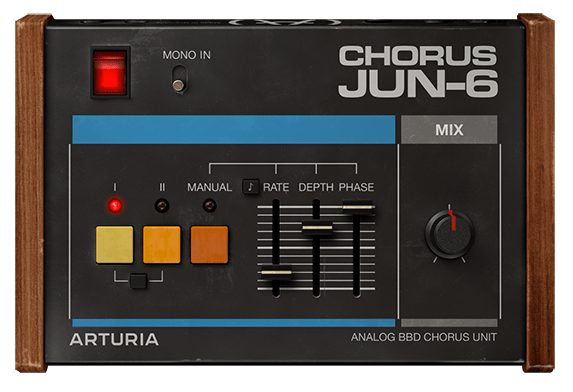
The power side is very simple. You can turn it on and off by pressing it. And if you select Mono In, the Stereo signal will be converted to Mono as mentioned above.

  • Buttons

First of all, there is a button that looks similar to the Chorus button on Juno. It’s not particularly difficult to use, simply click the button you want and the Chorus sound for the selected button will sound.

The black button below is used to press the I and II buttons simultaneously. Mode I is said to be a slightly quiet Chorus, and Mode II is a deep and rich Chorus. Surprisingly, pressing I and II at the same time does not produce the effect of combining the two, but rather sounds like Vibrato, not Chorus. Let’s take a look at this in a sound sample.

  • Manual Button

The Manual Button allows you to adjust 3 parameters. Rate can adjust the LFO rate between 0.050 Hz and 15.0 Hz, and the note display next to it can be adjusted from 1/64 to 8 (8 quarter notes) with the Sync button.

​Depth is said to be the amount of modulation applied to the BBD Delay. You can select from 0.00 to 10.0ms.

Phase literally means phase difference from the original. You can select from 0 to 180 degrees.

  • Mix Knob

You can turn the Mix knob to determine the amount of Dry/Wet signal from 0 to 100.

  • Samples

Likewise, I selected a few samples and tried them.

The order is original track -> I -> II -> press both I and II -> press Manual and set to very, very extreme settings, and the Mix knob is set so that Dry/Wet is 50:50.

How do you feel? Certainly, as explained in the manual, pressing both I and II seems to perform a Vibrato rather than a Stereo Chorus effect.

The extreme settings seem to produce very interesting results.

  • Chorus Jun-6 Overall Review

A simple yet effective Chorus.

In fact, I think in my head that I need to use modulation effects such as Chorus well when making a song, but it’s really difficult to actually apply them well, so I think it’s good to have a friend who can help me without any pressure. Actually, the biggest problem is that I haven’t studied enough and can’t experience it physically..

In any case, I think one advantage is that it is fairly intuitive. You can try walking right away and if you don’t like it, just take it out..^^

Arturia FX Collection 2 Plug-In Review (Part 3, Comp Diode-609)

※This article is a review written on July 21, 2021 after being selected for the FX Collection 2 experience group run by ‘Samick’ and receiving product support for a certain period of time. I only received support for the product and wrote the rest myself.

Finally, this is Diode-609, a clone of Neve’s 33609. Rupert Neve can be said to be synonymous with British sound. In addition to the famous Neve 1073, 1081, and 2254, he left a great mark by creating many famous sound equipment and companies such as the Focusrite and Portico series. Unfortunately, he passed away in February of this year…

​Neve 33609 is a solid state Compressor/Limiter 2 Step Processor using a diode bridge. (Although there is no limiter, this 2-step method is also used in the Shadow Hills Mastering Compressor) The diode bridge is made of a shunt (circuit configuration method) like the 1176, and is said to use 4 diodes. It is said to use Optical Gain Reduction and VCA, and like SSL G Comp, it has an Auto Release function.

​Arturia’s manual says that it was used with analog EQs such as Sitral W295 and was mainly used in the Mix Bus stage in the 70s and 80s, and was also used as a Master, etc., and as an individual Compressor. However, it is recommended to use it with analog EQ on the group and master bus.

I knew that 33609 was only available in Precision Comp from IK Multimedia in addition to UAD, so it was nice to see it as a new plug-in. I’m happy that I have a new option, but the thought of spending money again brings tears to my eyes..

​As it is a plug-in that I am interested in, I will compare Diode-609 with UAD’s 33609C along with sound samples.

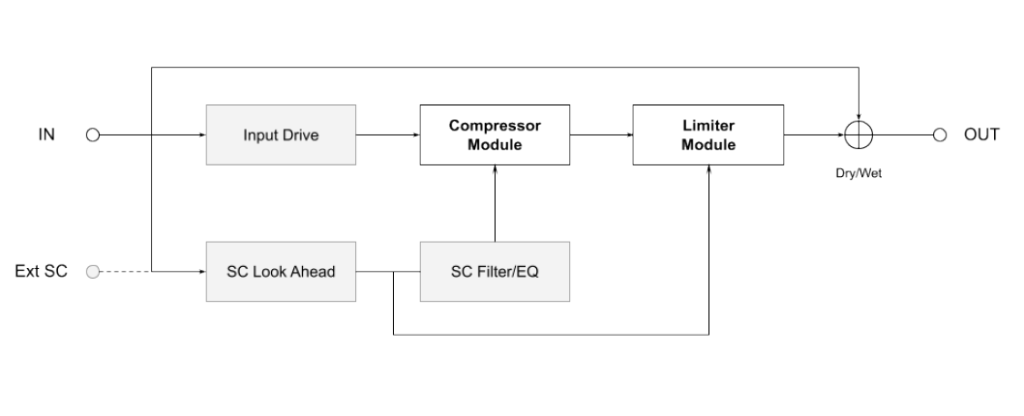
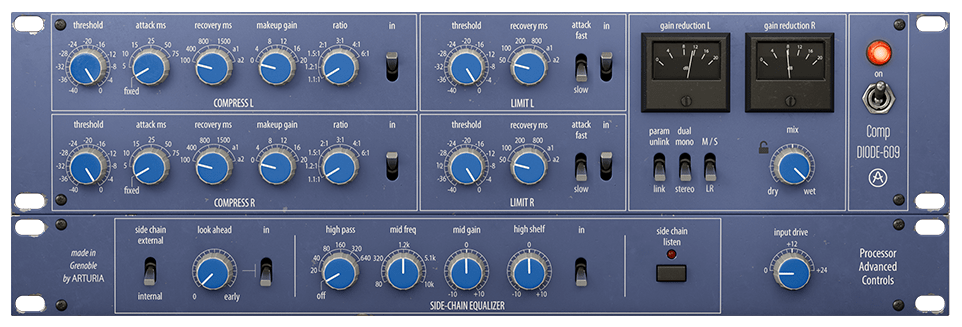
First of all, Signal Flow is like the picture. I think it will be easier to understand if you simply think of it as going through the Compressor, then the Limiter, and then going to Out.

You can think of this as the same as UAD’s 33609, but the difference is that UAD cannot use an external sidechain.

  • Control Difference

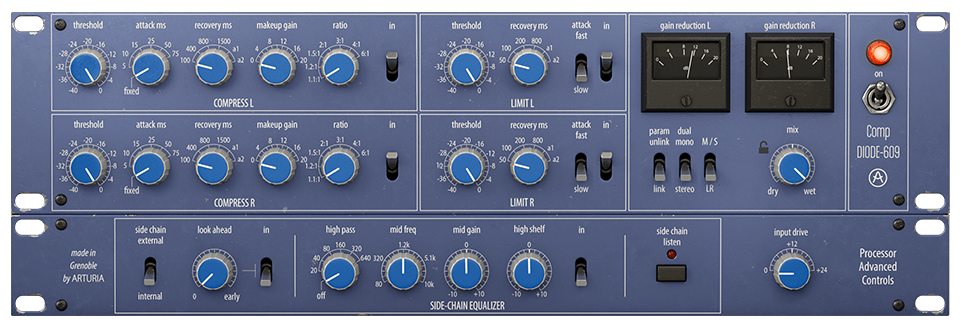
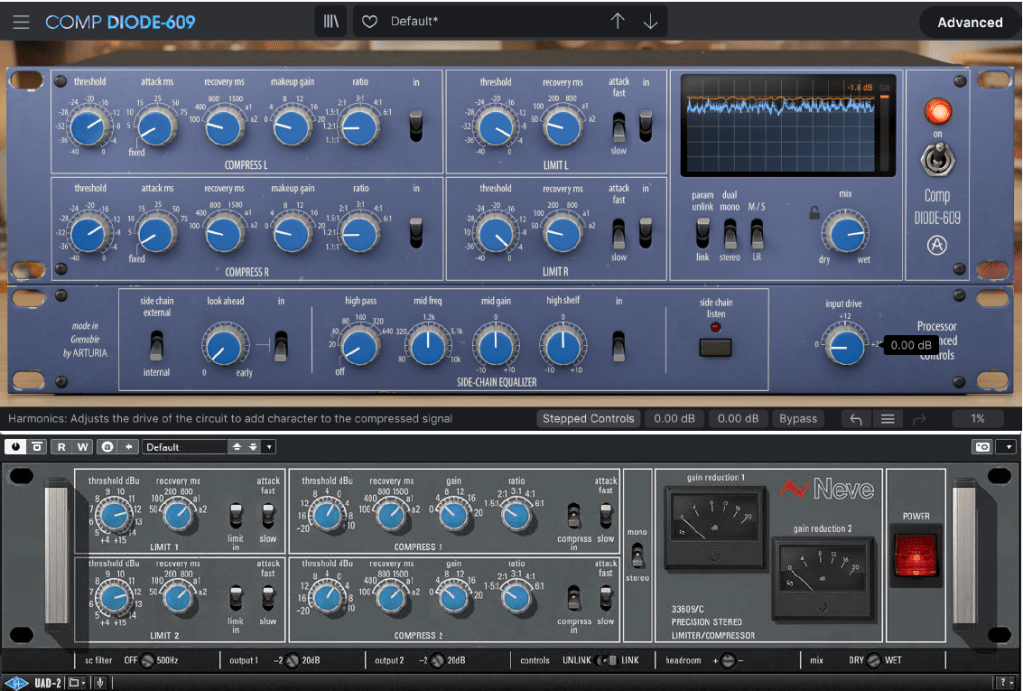
Just by turning on the plugin, there are some differences between UAD and Arturia’s clone plugins. Let’s take a look at not only the location of the compressor or limiter, but also the number of compressor knobs, additional knobs or switches, oscilloscopes, etc., one by one.

  • Compressor

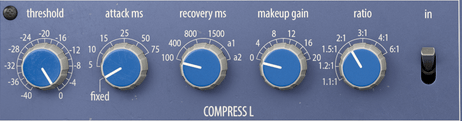
First of all, Arturia’s products can be adjusted smoothly by allowing you to choose between a step knob or a smoothly rotating knob. Previous products are the same, but I couldn’t tell you..^^;;

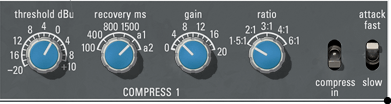
​Also, what is unique is that you can select the Attack Time. Arturia’s Attack is 5ms (Fixed, adopted from existing hardware), variable from 5 to 75ms, and UAD’s Attack is 3ms (Fast; they say it was adopted from existing hardware, but I don’t know why they are different from Arturia..^^;;) , 6ms(Slow).

Ratio can also be selected up to a smaller value, such as 1.2:1 or 1.1:1, and the Release value appears as a number, but Auto Release is slightly different. Arturia’s a1 automatically changes between 100ms and 2000ms and a2 automatically changes between 50ms and 5000ms, and UAD’s a1 automatically changes between 40ms and 800ms and a2 automatically changes between 150ms and 1500ms.

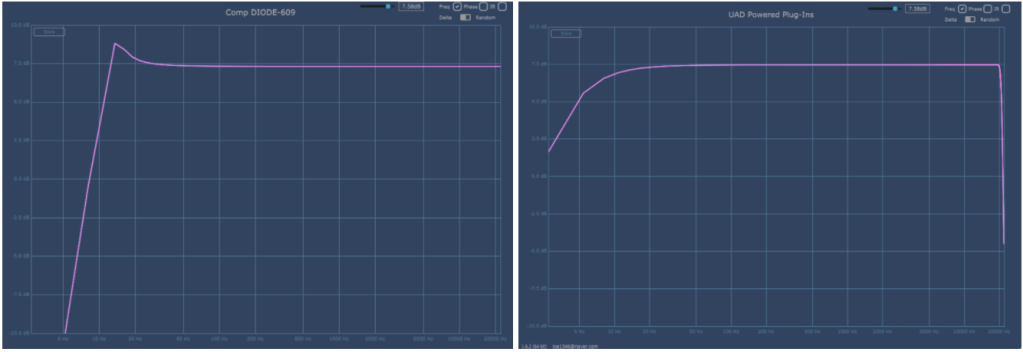
The basic Frequency graph when all limiters and compressors are removed from the plug-in are Arturia on the left and UAD on the right. The two are quite different.
Attack was set to Fix and Fast, Release was set to a1, and Ratio was set to 2:1. As the parameters change, the graph also changes.

Arturia is on the left, UAD is on the right. Harmonic Distortion is also a bit different.

​By the way, Arturia’s Diode-609 has a fairly high and shaky floor noise. It seems that the noise from the AC circuit was brought directly from it. Personally, I wish they could make this type of noise more selectable. The bass is about 150dB and the treble is about 140dB, so it’s low, but you still need to be careful when using it on individual tracks.

Also, the Compression Curve is slightly different. In particular, Arturia is impressive in that the sound becomes louder from a very quiet sound. I think it might be because of floor noise.

Both companies seem to have reproduced the part where compression occurs quite similarly.

  • Samples

I selected a few samples and compared them. Arturia set the Attack to Fixed, set the Release to a1, and only adjusted the Threshold and Make Up Gain.

There are three ratios: 1.5:1, 3:1, and 6:1.

No extreme processing was done. At 6:1, I adjusted the VU meter so that the needle moves only within 0 to 4 dB.

I feel sorry for not being able to tell you about various cases, but if I assume various cases and do everything, not only will I be tired, but I think the viewers will also be tired, so I will just compare them like this.

My personal experience is that Arturia’s Attack Fixed is slower and the minimum value of a1 Release is longer, so UAD reacts a little quicker. Conversely, Arturia responds more smoothly. I think you can feel this well in Drum.

In addition to these basic parameter differences, the characters of the two plug-ins seem to be quite different due to the difference in Harmonic Distortion.

  • Limiter

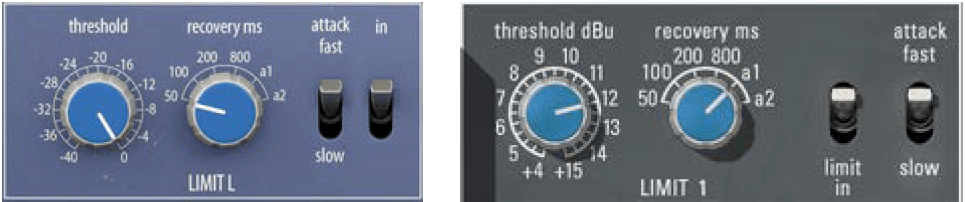
There is no significant difference in the limiter’s parameter configuration. The Attack Time of Arturia Diode-609 and UAD 33609C is the same at 2ms (fast) and 4ms (slow).

However, the difference in Release Time is that Arturia’s a1 is 100ms~2000ms and a2 is 50ms~5000ms, while UAD’s a1 is 40ms~2500ms and a2 is 150ms~3000ms.

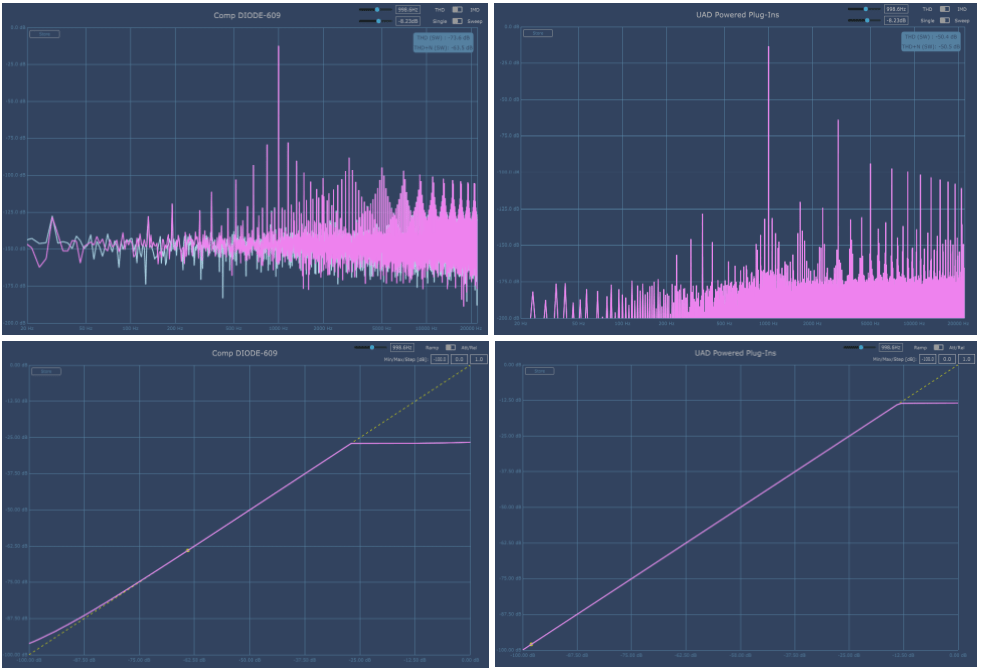
This is a graph where the Threshold is lowered to the minimum, Release is set to a1, and Attack is set to Fast.

Arturia is on the left, UAD is on the right. Like Compressor, Harmonic Distortion appears a little differently, and different Noise seems to be another characteristic.

​Compression Curve seems to appear similar. They press it without any mercy.

  • Samples

I selected a few samples and compared them.

Arturia and UAD both have the same parameters, so I set Release to a1 and only adjusted Fast, Slow, and Threshold of Attack. No separate gain compensation was provided.

Personally, I was surprised to find that it felt somewhat similar. I wonder if it’s because the attack time is the same and the attack nuance is similar.

However, the difference is noticeable in Release and the feeling of release is a bit different. Still, I don’t think the two feel completely different like Compressor.

  • Advanced Control

First, let’s look at the right side of the plugin. When you click on the VU meter, it turns into an oscilloscope measuring dB. You can click again to change it to a VU meter.

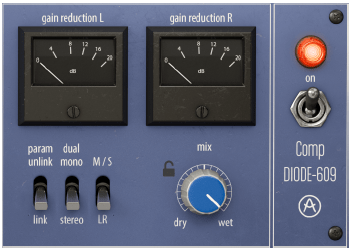
From the left below, there are three switches: a Link switch that links two channels, a switch that selects Stereo and Dual Mono, and a switch that allows Mid/Side processing.

Additionally, there is a Mix knob and power switch that can be used to mix original and processed sources.

Click Advanced in the top right corner of the plugin and Sidechain controls for triggers will appear below.

​I think this part is the biggest advantage of the Arturia Comp Diode-609. It can accept not only internal sidechains but also external signals, so you can use sidechains, and you can use the Look ahead function and Sidechain EQ for both internal and external signals. You can also listen to all of the sidechain signals.

The Input Drive on the right is not a Sidechain function, but a Saturation knob that makes Harmonics Distortion stronger.

  • Comp Diode-609 Overall Review

It is difficult to say that it is an exact replacement for the UAD Neve 33609 C, but I think it is a good friend to use for songs where the attack is not fast or strong.

​In particular, the Sidechain feature seems to have been included so well that I wish it were included in all Compressor plugins.

Another disappointing thing is that noise cannot be controlled. I wish there was an update to turn off the noise. Rather than saying “Wow! I love it!”, I think it’s just another new Bus Comp option.

Arturia FX Collection 2 Plug-In Review (Part 2, EQ Sitral -295)

※This article is a review written on July 21, 2021 after being selected for the FX Collection 2 experience group run by ‘Samick’ and receiving product support for a certain period of time. I only received support for the product and wrote the rest myself.

EQ Sitral-295

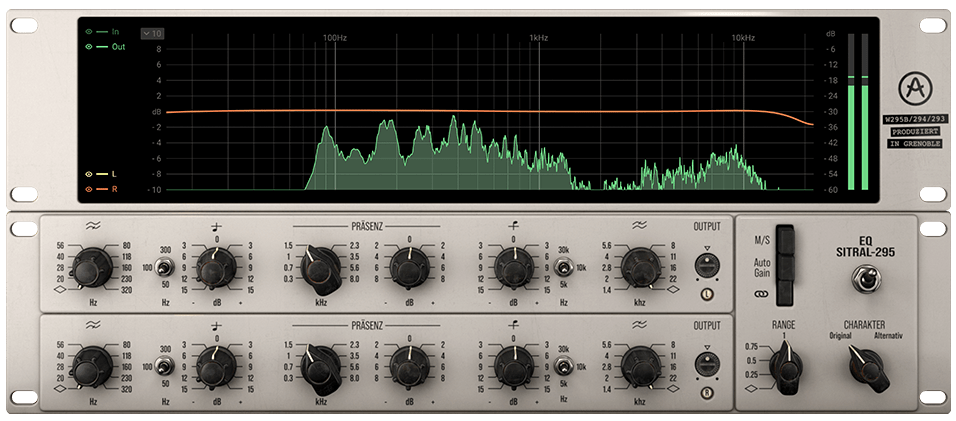
The Sitral-295 plug-in is a clone plug-in of the Siemens Sitral W295 EQ.
Siemens Sitral W295 EQ is an EQ module included in the Sitral console produced by Siemens, and was produced in West Germany in the 60s and 70s.

Siemens is the parent company of the former Telefunken company and is now a multinational conglomerate, so it would be a good idea to take a look if you are interested in the history of equipment.

​This Sitral-295 plug-in consists of a total of 3 modules and is composed of Discrete Class A. Surfing the web, I heard that you can think of German-style Pultec or Neve. There is also a story behind the fact that many of Neve’s devices originated from the Sitral console’s schematics.

Some say that it seems that Rupert Neve copied the Sitral console’s U273 limiter circuit diagram and created the Neve 2254.

The Signal Flow of the Sitral-295 plugin is as shown in the photo above.

Excluding the three switches, Range, Charakter (German), and Auto Gain, you can think of it as simply moving from the left to the right of the plug-in. Each function will be explained in the description of the module below.

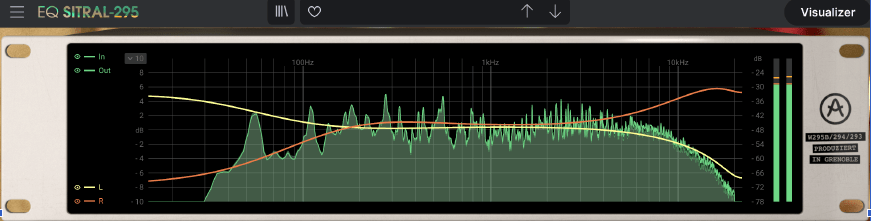
  • Visualizer

A Visualizer is literally just an analyzer. It shows the EQ curve adjusted by LR or MS, and shows the audio frequency currently being played.

Analog device clone EQ plug-ins often do not have this function, so it is a bit inconvenient when using them for the first time, but Arturia seems to have done a good job keeping this convenience in mind.

  • Saturation
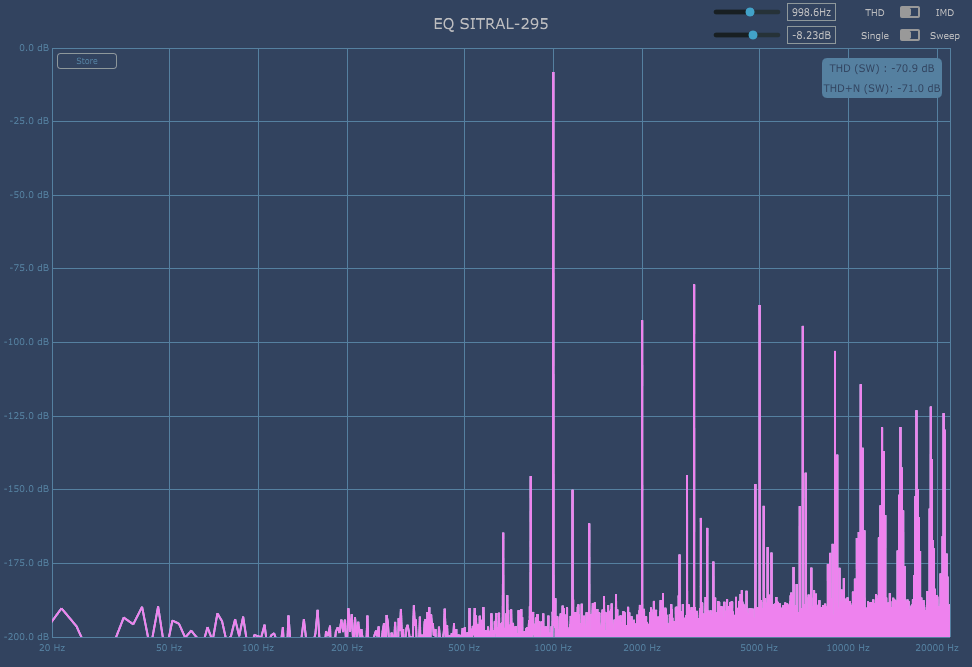
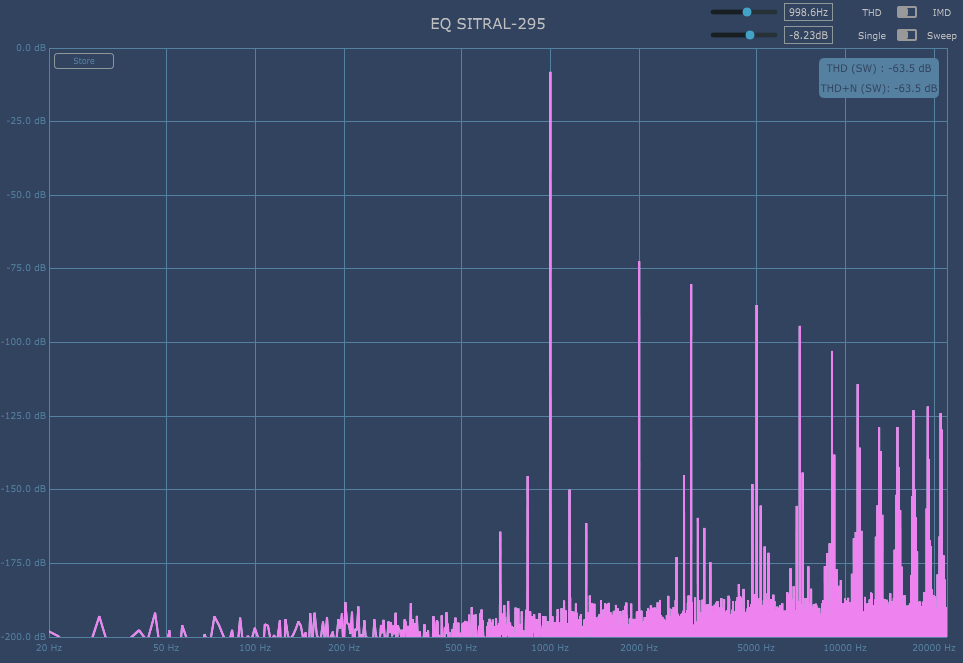
Harmonic Distortion of Original Charakter
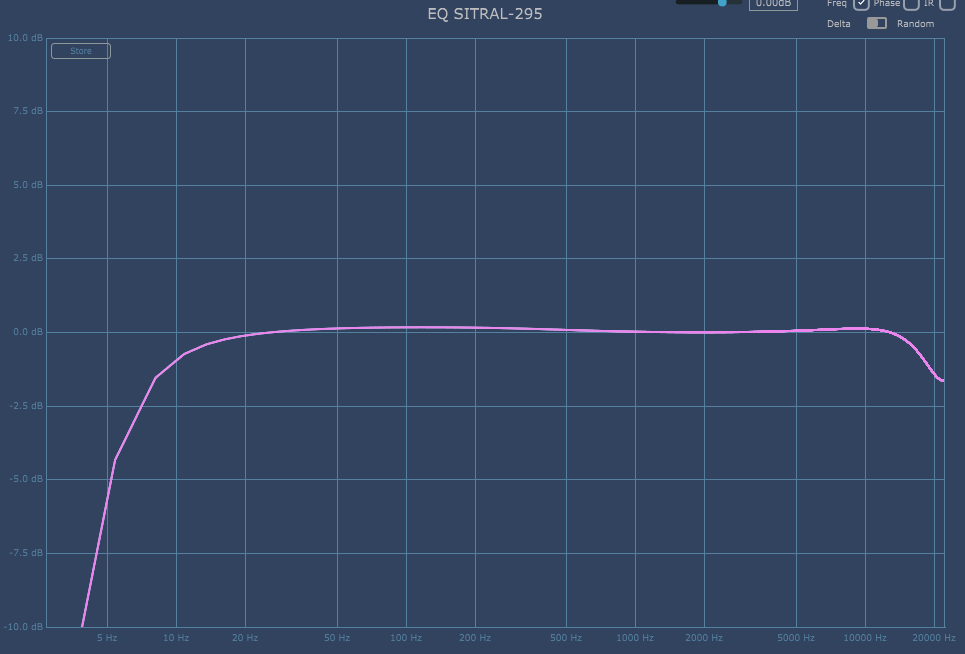
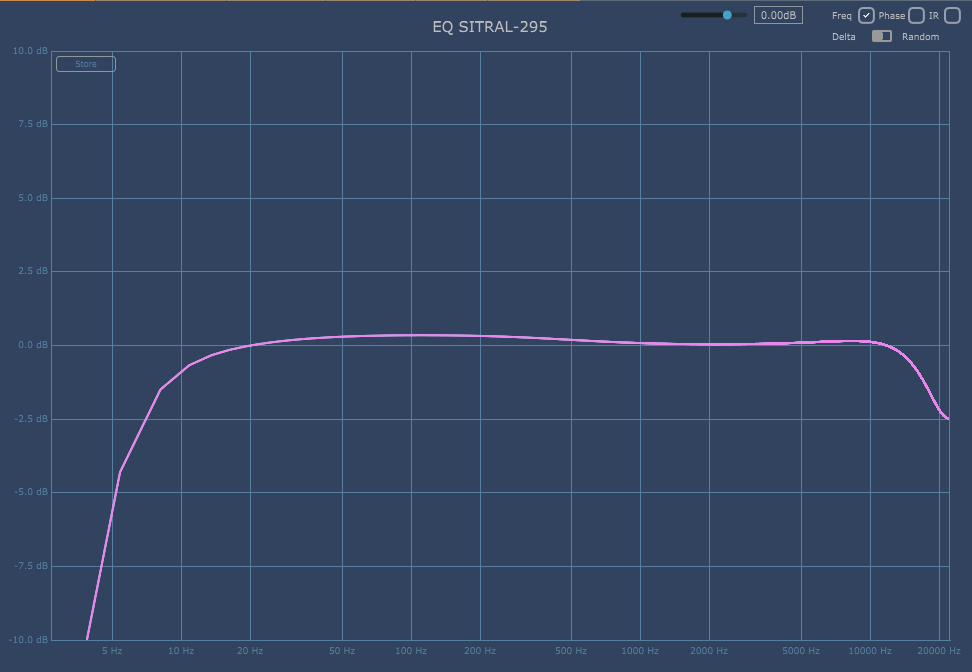
Frequency Response of Original Charakter

Sitral-295 is an EQ that adds saturation by default even if you select nothing. Even with all EQ and filters turned off, high cut is applied from about 14kHz and low cut is applied from 10 to 20Hz.

Harmonic Distortion of Alternativ Charakter
Frequency Response of Alternativ Charakter

If you change the Charakter from Original to Alternativ, the nuance of the cut will change slightly, and the second overtone will rise slightly.

  • Module 1, 2

Out of a total of 3 modules, 2 modules have the same configuration and are responsible for Left and Right respectively. These two modules consist of Filters on both sides and three EQs in the center.

The slope of the filter is not separately written, but I measured it with Plugin Doctor and it seems to be around 8~9dB/Oct. Actually, these types of double EQs are used for a saturation feeling rather than a surgical feeling, so the slope value doesn’t seem to be particularly important, but it would have been better if it had been written down..^^

For the remaining EQs, the Q value cannot be adjusted, and the low range can be adjusted to a fixed dB of 50, 100, and 300Hz, the midrange to 300~8000Hz, and the high range to a fixed dB of 5, 10, and 30kHz.

When I used it myself, it felt brighter in the mid-range than the UAD Neve 1073, and the mid-low range was somewhat similar to that of the UAD Pultec, but the mid-high range felt very different. I think you can just think of it as a new Saturation EQ.

​When I just turn it on in the sibilance band by default, it sticks out with a sharp feeling that I don’t like, so it’s a bit burdensome, but I think it’ll be fine if you just organize that band well. Or, I don’t think it would be a bad idea to just set it as default to friends who lack the 3~5kHz band.

  • Module 3

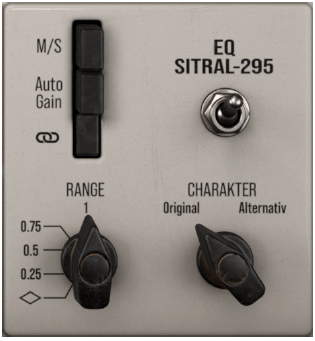
The third module has switches. M/S is a button that changes to Mid/Side, Auto Gain is a button that makes the amount of input gain and output gain the same, and the chain shape below is a link button that links L, R or M, S.

You can think of Range as similar to the Mix knob. At diamond shape, EQ and Filter are not applied at all, and at 1, they are applied at 100%. 0.5 applies only to 50%.

As mentioned above, Charakter is a switch that slightly changes the basic Frequency Response and Harmonic Distortion.

  • EQ Sitral-295 overall review

I think the Saturation EQ leaves something to be desired in the mid to high range. Of course, you can adjust it, but in fact, it is quite annoying to adjust it..^^;;

Still, Sitral-295 definitely has character, so I think I’ll use it someday.

I created a sample track in the order of the original track – Arturia EQ Sitral-295 – UAD Neve 1073 – UAD EQP-1A, so if you are curious, you can give it a listen.

Arturia FX Collection 2 Plug-In Review (Part 1, Bus Force)

※This article is a review written on July 21, 2021 after being selected for the FX Collection 2 experience group run by ‘Samick’ and receiving product support for a certain period of time. I only received support for the product and wrote the rest myself.

Before starting

Hello? This is engineer and singer-songwriter Jooyoung Kim!

This time, I was selected as a member of the experience group for Arturia FX Collection 2 conducted by Samick and wrote a review.
Although my skills and knowledge are still lacking, I would appreciate it if you could be lenient.

So shall we begin?

The reason I applied to the Arturia FX Collection 2 experience group

Was it around the beginning of this year?.. Music Tribe, the parent company of Behringer, and companies such as Sweetwater and Thomann formed a direct partnership, making it possible to purchase Music Tribe products at a much cheaper price than before.

I was also curious about reprinted products, so I was looking around and came across a reprint of the Roland Dimension-D SDD-320, which Klark Teknik has been selling since around October of last year.

Above all, the price was about $150, and even including the shipping cost, it was only $200, so I thought a lot about whether or not to buy it because I thought there would be no tariffs. However, it was too risky to buy it blindly, so I looked up some reviews.

https://gearspace.com/board/gear-shoot-outs-sound-file-comparisons-audio-tests/1323683-roland-dimension-d-comparison.html

Fortunately, Gearslutz, now Gearspace, has conducted tests on all Dimension-D clones.

There were a lot of different things, including reprinted hardware, but surprisingly, the one I liked the most was Arturia’s Dimension-D.
So, I decided to put aside the hardware clone and buy a plug-in later.
Time passed like that, summer came, and I heard that Arturia had released the FX2.

As well as Roland’s Dimension-D, there was a Neve 33609 clone, an STA clone, and a bunch of other good-looking plugins. I was quite interested in it because I knew that the quality of the plug-ins bundled with Arturia’s audio interfaces was not bad.

However, it was sold for $149 as a launch discount, but I was not able to purchase it because I had already bought a lot of plugins due to other companies’ summer sales.

Meanwhile, I saw a post on a community ‘Cuonet'(Korean music community) that was recruiting FX Collection 2 experience groups, so I applied for the experience group.

Features of FX Collection 2

The existing FX Collection is

3 Filters: MINI, M12, SEM
3 preamps: 1973, TridA, V76
3 Reverbs: Plate-140, Intensity, Spring-636
3 Delays: Tape-201, Memory-Brigade, Eternity
3 Comps: VCA-65, Tube-STA, FET-76

It consisted of a total of 15 plugins.

4 Modulations: Dimension-D, Jun-6, BI-Tron, BL-20
3 Mix Buses: Force, Diode-609, Sitral-295

With these 7 plugins added, it consists of 22 plugins.

Introduction to newly added plugins

The seven plug-ins added this time are all clones of existing hardware.
(BUS Force is slightly different. It is based on hardware, but it can be said to be a unique plug -in of Arturia)

Personally, I will take a closer look at Diode-609 and Dimension-D, which I personally find most interesting among the newly added plug-ins, and briefly look at the rest of the plug-ins along with their plug-in descriptions.
(I think it would take too much time to organize the remaining plugins..^^;;)

Bus Force

Bus Force is a plug-in designed to be attached to a bus stage like a typical Channel Strip plug-in.
They didn’t say exactly which one was cloned, but judging from the nuances in the manual and website description, it seems like the EQ was a clone of Pultec EQ and the filter was a clone of SEM’s Filter.

The compressor is only listed as a VCA type, but since it can even achieve negative compression, I think it is a combination of compressors such as dbx160, SSL G Comp, and API 2500 (I’m not sure about this). Saturation also seems to have various functions by combining several devices.

Signal Path is designed to solve all problems with one plugin.

The signal entering Bus Force is divided into three in the plug-in and subjected to parallel processing.
The first signal only takes EQ, the second signal takes Eq, Filter, and Compressor, and the third signal takes Eq, Filter, Compressor, and Saturation.

​Each signal can be muted or its gain can be adjusted, and effects on each path can be removed. And finally, after the three signals are combined, they go through clipping and are sent to the final output stage.

  • EQ

This EQ is said to be a reprint of Pultec. After experimenting with some samples myself and checking with Plugin Doctor, I was a little disappointed that Harmonic Distortion (Saturation) was not included.
(There is Saturation in the 3rd signal path, so I think you should use that)

However, I liked that the Q value and frequency value could be adjusted more flexibly than other Pultec EQ clones, and it seemed to create a smooth EQ effect well.

This is the frequency response that appears when only EQ is added. As you can see, no overtones are visible. Noise is the default noise and is at a level of -150dB.

The manual says that if you want to preserve the feeling of air, try adjusting the Hi Frequency Curve to about 4.5.
In fact, if you adjust it like that, the air feel of the sound will come out a lot.

  • Filter
It is convenient to be able to view the parameters being adjusted and the frequency response on the plug-in’s analyzer. Also, as you can see from the frequency response graph, odd-numbered harmonic distortion is usually present.

I don’t know much about filters in synthesizers, so I can’t say whether the clone was good or bad.

However, since it can create peaks, it seems to be convenient to use when organizing the bass, and it also seems to be useful for smoothing out the high frequency part.

The slope of each filter is 12dB/oct, which is commonly used in filters. Also, when the Filter is activated, Harmonic Distortion is added and Saturation is added.

  • Compressor

This VCA type compressor can receive internal sidechain and external sidechain signals and compress them. As a compressor attached to the bus, I was surprised that it expressed the feeling of glue better than I expected.

In particular, it was nice to be able to provide a frequency of up to 2000Hz when using the internal sidechain. This may be useful when giving signals using hi-hats or high-frequency percussion.

However, one thing that is disappointing is the GR lamp. One light comes on every time 8dB is attenuated, but in fact, it is not common to apply that much compression at the bus stage… Of course, you can apply strong compression and mix it in a parallel way…^^;;

It is a clean type compressor that does not produce much harmonic distortion. When adjusting the Compressor, the analyzer is displayed like this.

Ratio (Force) can range from 1:1 to minus, Attack can be adjusted from 1 to 300ms, and Release can be adjusted from 1 to 500ms. I think it would have been a little better if there had been an Auto Release like SSL G Comp or Neve33609.

Still, it was a compressor that seemed to be useful when you wanted clean compression.

  • Saturation
The feeling of all three saturations is different. Even with Overdrive, it changes again. Also, Harmonic Distortion is all strong.

Saturation was very interesting. You can choose from three saturations: Thick, Odd, and Even, and the saturation is quite strong.

In particular, the saturation is quite strong in Thick. Even the slightest touch to Overdrive will result in significant saturation. The larger the value of both parameters, the more the waveform is affected.

  • Clipping

Clipping is literally a clipper. I expected it to be soft clipping, but it was just a very strong limiter.

The waveform is distorted into a square like a typical distortion pedal, and the compression is cut very cleanly. Harmonic Distortion also comes up. It was a bit disappointing that it wasn’t soft clipping.

  • Bus Force overall review

There are one or two things that are disappointing, but I think the Compressor alone would be useful. However, the biggest drawback of this plugin is that it consumes a lot of CPU.

Even though I only used 3 inserts, it took more than 1/4 of the space… (The CPU was using an Intel 8th generation i7-8700)

I think it would be a bit difficult to use it multiple times other than literally attaching one or two to the final stage, such as the Bus stage or Master stage.

I really liked the Compressor.