Zynaptiq Pitchmap Sale (until July 28)

Hello, I’m Jooyoung Kim, an engineer and music producer.

Today, I want to introduce Pitchmap, a plugin by Zynaptiq that’s frequently used in color bass music.

For this review, I requested an NFR (Not for Resale) code for Pitchmap from Plugin Boutique. Thankfully, Zynaptiq provided me with the ZAP IV bundle code. I’d like to express my gratitude to them. Besides Pitchmap, I’ll be reviewing other Zynaptiq plugins during their sale periods.

Let’s get started!

Pitchmap is a pitch correction plugin created by Zynaptiq in 2013.

While pitch correction is commonly associated with vocal tuning, Pitchmap is more often used in remixing and sound design.

The horizontal axis represents pitch, similar to a keyboard roll.

Although only three octaves are shown,

you can adjust the display by clicking the light gray area at the top to navigate to the desired pitch range.

The vertical axis represents time, with red/orange markings indicating the pitch at that specific time. Essentially, the X and Y axes are flipped compared to typical vocal tuning plugins.

The white bars show relative volume, and the circles indicate pitch shifts.

For example, moving a circle representing F# upwards changes the sound from F# to G.

This allows you to change the key of the entire piece arbitrarily.

Double-clicking on a circle transforms it into various shapes: inverted triangle, triangle, square, etc.

  1. A square maintains the pitch within the same octave.
  2. A circle shifts to the nearest pitch (up by 9 semitones or down by 3 semitones).
  3. An inverted triangle always shifts downwards.
  4. A triangle always shifts upwards.

In Key Edit mode, you can click on notes in the piano roll to exclude them from playback.

Clicking Bypass and selecting notes in the piano roll means those notes will bypass the effect.

You can also allow MIDI input to select pitches in real-time through a MIDI channel.

You might wonder if these changes would make the sound awkward, but surprisingly, the result is quite cohesive, making Pitchmap ideal for remixing.

The white bars in the top piano roll can be moved to set a specific pitch range. The image above sets the range from Eb downwards to be excluded.

Other parameters include:

  1. Threshold: Determines the extent of tuning (lower values mean more comprehensive processing).
  2. Feel: Controls subtle pitch variations after tuning (higher values retain more nuance).
  3. Purify: Reduces noise above 50% and increases noise below 50%.
  4. Glide: Adds glide/portamento effects.
  5. Electrify: Enhances the synthetic feel or optimizes signal processing.

Exploring the rest of the features will help you understand their functionalities better.

This plugin is not only useful for contemporary music, often centered around remixes and bass, but also for creating unique sounds in other genres. Personally, I enjoy blending these elements into string or band sections for a sophisticated and effective sound.

I’ll share some YouTube videos demonstrating how I use Pitchmap.

The current sale lasts until July 28, and the discount is substantial. If interested, I highly recommend purchasing.

Additionally, purchasing from Plugin Boutique entitles you to a free plugin. This month, the options are Frostbite 2 by AudioThing or EQuivocate by Newfangled Audio.

Frostbite 2 offers various modulation effects, and EQuivocate is a graphic EQ with auditory filters and a Match EQ feature. Personally, I’d choose Frostbite 2.

See you in the next post!

Choosing Speakers by Reading Spinorama Charts!

Hello! this is Jooyoung Kim, an engineer and music producer.

Today, I’d like to explain Spinorama, a concept anyone interested in sound and speakers should know. Let’s get started!

Example of a Spinorama Graph

First, let’s briefly look at the history of how Spinorama measurements were developed.

Spinorama was created in the 1980s by Dr. Floyd Toole, a leading authority on speaker acoustics, while he was working at the National Research Council of Canada. In the 1990s, it was further refined in collaboration with Harman International. It has since been incorporated into standards issued by the American National Standards Institute (ANSI) and the Consumer Electronics Association (CEA).

Standard Method Of Measurement For In-Home Loudspeakers

The measurement process, as shown above, involves taking measurements every 10 degrees horizontally and vertically in an anechoic chamber, resulting in a total of 70 data points.

This looks intense…

The collected data is represented in six frequency response graphs known as Spinorama charts.

KEF R3 META

Let’s look at the Spinorama graph for my recently purchased KEF R3 META. The vertical axis is dB SPL (the unit we often use to measure sound levels, like airplane noise), and the horizontal axis is Hz (the unit of frequency).

  1. The top blue line is the On Axis response, representing the frequency response directly in front of the speaker. Manufacturers commonly provide this graph, but it lacks comprehensive information.
  2. The second orange line is the Listening Window response, which averages the frequency responses from ±10 degrees vertically and ±30 degrees horizontally, totaling 9 measurements. This approximates the expected response in a typical listening environment.
  3. The third red line represents Early Reflections, showing the response of early reflected sounds. It averages 8 measurements taken at ±40, ±60, and ±80 degrees horizontally, and ±50 degrees vertically. A significant difference from the On Axis and Listening Window responses helps distinguish between direct and reflected sounds.
  4. The light blue Sound Power response averages all 70 measurements. The more this graph parallels the other graphs without significant fluctuations, the better the speaker’s acoustic performance.
  5. The green Early Reflections DI (Directivity Index) is the difference between the On Axis and Early Reflections responses. This graph helps to quickly understand the difference between direct and reflected sounds.
  6. The brown Sound Power DI is the difference between the On Axis and Sound Power responses. Research suggests that smoother changes in both DI graphs are preferred by listeners (I’d provide the exact study, but finding it would take some time… I’ll update if I come across it later).
Genelec 8351B
  1. The On Axis chart shows the basic frequency response.
  2. The closer the Listening Window response is to the On Axis response, the more similar the sound will be for the listener and those around them. This indicates good off-axis performance, meaning the sound remains consistent even if the listener moves slightly.
  3. The more aligned the Early Reflections, Sound Power, and On Axis graphs are, the higher the preference among listeners. If it’s hard to judge, check the DI graphs for a consistent slope.

This gives a basic understanding of Spinorama charts.

Of course, Spinorama charts have their limitations. As the title suggests, you shouldn’t choose a speaker based solely on these charts. However, they are a fundamental indicator for understanding a speaker’s performance, making them valuable knowledge for anyone in music or sound.

In future posts, I’ll discuss near-field measurements by the German company Klippel.

Finally,

https://www.spinorama.org/

This site offers Spinorama charts for many speakers measured so far. Since it aggregates data from various sources, make sure to choose highly reliable sources in the settings tab for accurate information.

I hope this post is helpful for you! See you in the next post!
Basics of Mixing – 5.4 Phase Issues in EQ

Hello, this is Jooyoung Kim, an engineer and music producer.

Today, I’d like to discuss a crucial aspect to consider when adjusting EQ: phase issues.

The image above shows the phase change graph when using the Brickwall feature in Fabfilter Pro Q3.

Phase change is generally represented as a continuous line. However, when drawing the graph continuously, the size becomes too large, so the vertical range is usually set to 2π, and the line continues from the top or bottom when it breaks. It’s quite difficult to explain in words.

Anyway, considering such factors, the jagged phase changes can still significantly affect the sound. Extreme phase changes can make the sound seem as if an unintended modulation effect is applied, so it’s important to use it carefully.

Because of these issues, Linear Phase EQ was developed. Linear Phase EQ does not cause phase issues. However, it introduces a phenomenon known as Pre-Ringing.

  • Pre-Ringing Phenomenon

Pre-Ringing occurs when using Linear Phase EQ, causing the sound to ring before the waveform. Try bouncing your track using Linear Phase EQ. As shown in the image above, you’ll notice a waveform appearing at the front that wasn’t there originally.

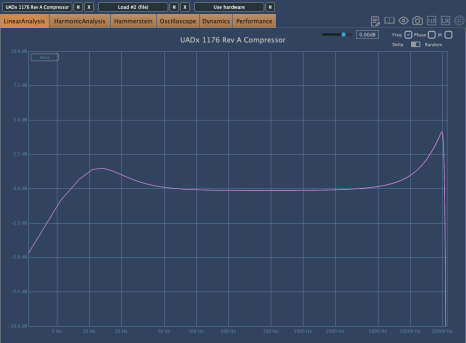
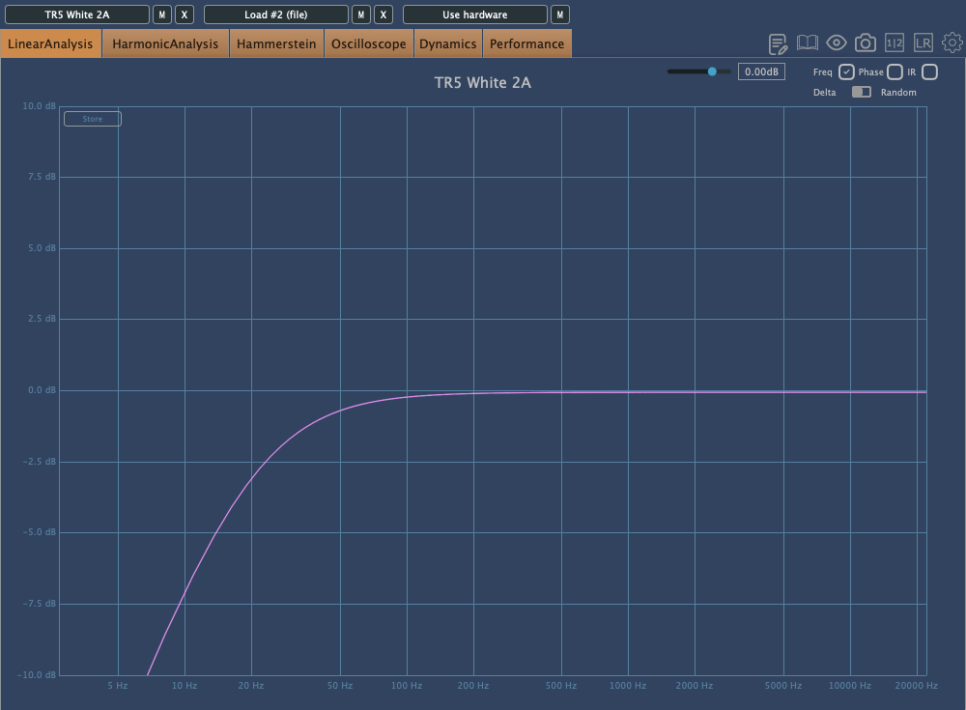
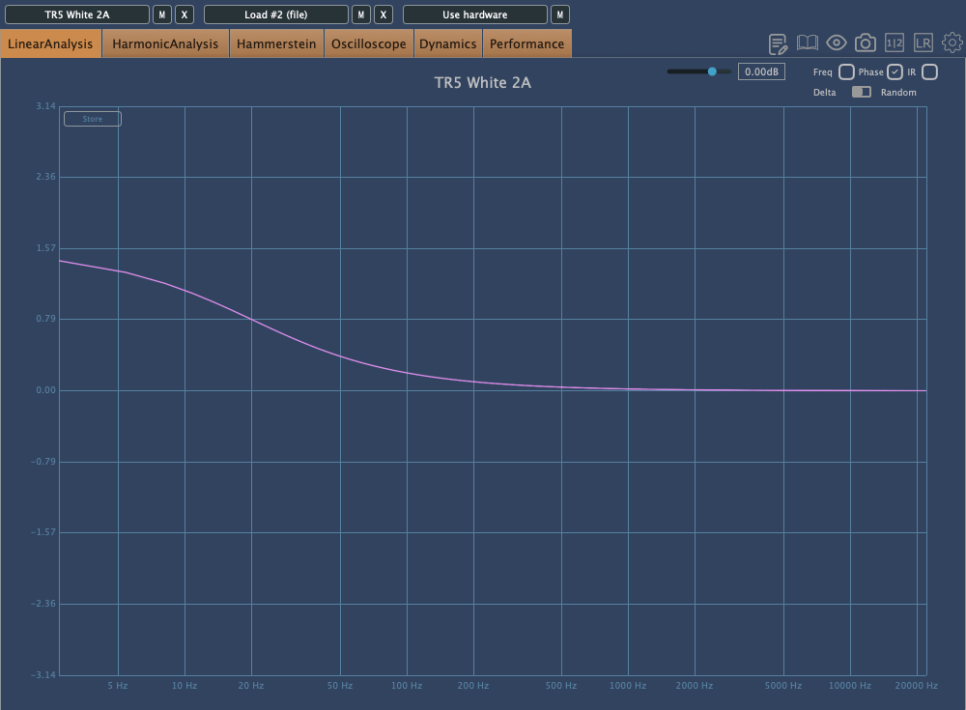
Other than digital EQs, many plugin emulations of analog EQs alter the phase and frequency response graphs just by being applied.

For instance, consider the commonly used Maag EQ4 for boosting high frequencies.

On the left is the frequency response graph when only the Maag EQ4 plugin is applied without any adjustments, and on the right is the phase change graph under the same conditions.

Here’s what we can deduce about using EQ:

  1. Applying an EQ can change the basic frequency response from the start.
  2. Non-Linear Phase EQs will inevitably cause phase changes.
  3. Linear Phase EQs can introduce Pre-Ringing, creating new sounds that were not there originally.
  4. EQ plugins or hardware with Harmonic Distortion can add extra saturation to the sound.

Understanding these points is crucial when adjusting EQ.

Of course, there are many excellent engineers who achieve great results without knowing all these details. Ultimately, the most important thing is that the sound comes out well, regardless of understanding the underlying principles.

However, I personally feel more comfortable when I have a solid understanding of the fundamentals. So, knowing this information can never hurt.

That’s all for today. I’ll see you in the next post!
Basics of Mixing – 5.3 Using EQ for Different Purposes

Hello, I’m Jooyoung Kim, an audio engineer and music producer.

Today, we’ll explore the use of EQ for different purposes. EQ is generally categorized into two types: Tone Shaping and Surgical.

1) Tone Shaping EQ

Tone Shaping EQ is used for:

  1. Altering the tone of instruments
  2. Changing the tone of instruments through the saturation provided by the EQ itself
  3. Adjusting the vertical position of instruments within the stereo image

Examples of Tone Shaping EQs include the Pultec EQ,

The renowned Neve 1073,

And the API 550 and 560 EQs.

Digital EQs like the Pro Q3 can also be used for Tone Shaping, though they lack saturation.

2) Surgical EQ

Surgical EQ is used to solve problems in the audio source. It’s used for addressing proximity effects, resonances, sibilance (often handled by a de-esser but sometimes with EQ), and various other unpleasant sounds that can occur during recording.

For these tasks, EQs without inherent coloration are preferred, typically with a high Q factor (narrow bandwidth). It’s beneficial to use EQs with an internal sidechain function (often labeled as an audition feature) that allows you to listen to the affected frequencies in isolation.

I mainly use the bx_hybrid V2 because I’m familiar with it, but most modern digital EQs come with an internal sidechain function, so any of them should work fine.

  • Conclusion

Using Tone Shaping EQ effectively requires an understanding of stereo imaging and tonal concepts. Surgical EQ, on the other hand, necessitates the ability to identify problems by ear. Ultimately, it takes practical experience to develop these skills.

I’m not claiming to be a highly experienced or notable expert, but I’ve found that there’s a significant difference between knowing these concepts in theory and applying them in practice.

Good luck to everyone studying sound engineering!